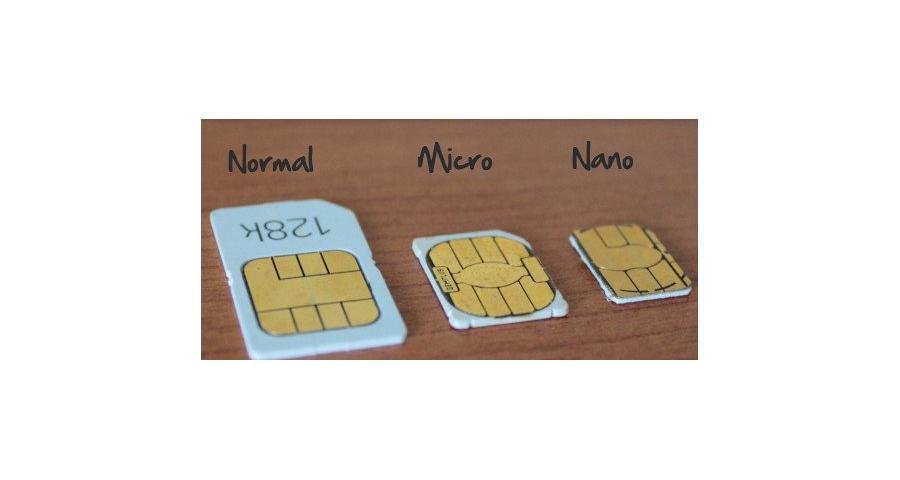
Looking to upgrade your iPhone and wondering if you'll need a new type SIM card ? Take a look at our list below to see the SIM card compatibility with each iPhone model:
| iPhone Model | SIM Card Type |
| Original iPhone (2G) | Mini SIM |
| iPhone 3G | Mini SIM |
| iPhone 3GS | Mini SIM |
| iPhone 4 (GSM) | Micro SIM |
| iPhone 4 (CDMA) | NO SIM CARD |
| iPhone 4S (GSM/CDMA) | Micro SIM |
| iPhone 5 (GSM/CDMA) | Nano SIM |
What is the difference between CDMA and GSM? GSM phones are phones that take a SIM card and can be activated with the SIM card. These phones have IMEI numbers that are used to reference the phone. CDMA phones are phones that do not need a SIM card, but are activated through the MEID number through the carrier you are using. The most popular GSM networks are AT&T and T-mobile, where as the more popular CDMA carriers are Verizon and Sprint. If a phone is factory unlocked, it can be used on any GSM network, for example Simple Mobile and Straight Talk. If you want to purchase a phone for one of these types of carriers, look to see if it is a GSM carrier, and you can purchase an unlocked phone to use.
How do you remove/add a SIM card? For iPhone 2G/3G/3GS/ the tray is at the top of the phone. For the rest of the models, at the righthand side of the phone there is a little slot with a hole in it. If you purchase a brand new iPhone, the manual usually has a SIM pin that you can use. Just push the hole with the pin and pop the SIM tray out. If you do not have a SIM pin, you can use a needle pin or unwind a paper clip to pop the SIM tray out.
If you're upgrading to a new model and need a new SIM card, you can usually order this from your carrier. They might charge you for the SIM. You also have the option of buying a SIM card cutter and cutting the SIM card you are currently using to fit into the new phone. These can be pucrhased on online markets such as eBay or Amazon.